QR Codes for Product Packaging: 8 Ways to Use Them
Add a QR code to your product packaging and link it to instructions, reviews, reorder pages, or seasonal promos. Change the destination anytime without reprinting.
Packaging space is limited. Once you print a label, whatever's on it is permanent. And you have no way to tell if customers actually read it. A dynamic QR code solves all three problems. It takes up about two square centimeters, links to anything you want, and you can change the destination after the packaging is already on shelves.
8 Ways to Use QR Codes on Product Packaging
Once a QR code is on your packaging, it becomes a gateway to anything digital. Here are eight practical use cases, starting with the most common.
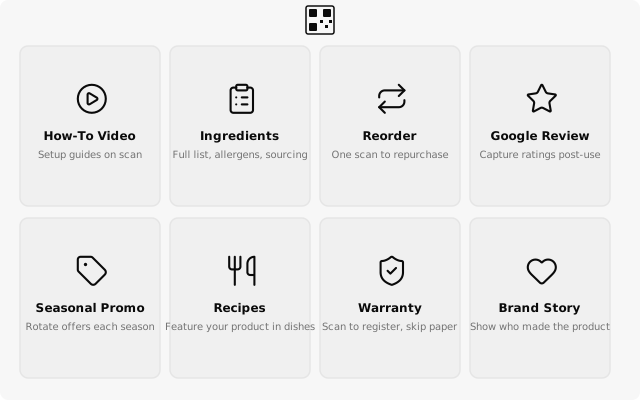
Product instructions or how-to video. Link to a setup guide, assembly video, or usage tips that would never fit on a label. When you record a better video, update the link. Every box already shipped points to the latest version.
Ingredient or material sourcing. Transparency builds trust. Link to a full ingredient list, allergen details, or sourcing information that won't fit on the physical label. Especially useful for food, supplements, and skincare.
Reorder or subscription page. One scan takes the customer straight to a reorder page or subscription signup. You catch them at the exact moment they're thinking "I need more of this."
Google review prompt. Link to your Google Business review page. Customers scan right after using the product while the experience is fresh. One of the simplest ways to grow your review count.
Seasonal promos or discount codes. Change the destination every season. Holiday discount in December, back-to-school promo in August, same printed packaging all year. You can create your codes with a free QR code generator and start rotating promotions right away.
Recipe ideas. For food and beverage products, link to a recipe page featuring your product as an ingredient. Rotate recipes by season or trend by updating the destination.
Warranty registration. Replace paper warranty cards with a scan-to-register flow. Faster for the customer, better data for you.
Brand story or about page. Let customers learn who made the product and why. Works especially well for small-batch, local, or mission-driven brands.
Every one of these use cases works with a single dynamic QR code per product. Print it once, change where it points whenever you want.
Where to Put the QR Code
Primary packaging (the bottle, jar, box, or bag itself) is where customers see the code every time they use the product. This is the best spot for ongoing engagement like reorder links, recipes, or instructions.
Secondary packaging (outer box, sleeve, or display carton) works well for in-store engagement before purchase. Link to ingredient details, reviews, or your brand story. Keep in mind that secondary packaging often gets discarded after unboxing, so it's better suited for pre-purchase actions.
Package inserts (cards or leaflets inside the box) are ideal for post-purchase actions. Warranty registration, review prompts, and "10% off your next order" codes all perform well here. This is especially common for DTC and ecommerce brands that ship directly to customers.
Do not place QR codes on highly curved surfaces (like the side of a narrow bottle) without testing. Curves distort the pattern and can prevent scanning. Use a flat area, or increase the code size to compensate.
Printing Checklist
Keep your QR code at least 2 x 2 cm (0.8 x 0.8 in), leave a quiet zone (white border) around it, and make sure there's high contrast between the code and the background. Dark on light works best. Always test on the actual packaging material before a full production run, since some textures and finishes can interfere with scanning. Use dynamic codes so you can change the destination after printing. For the full reference table on sizes and distances, see the QR code size guide.
Why Dynamic Codes Matter for Packaging
Packaging runs are expensive. A static QR code bakes in a URL that can never change. If your website restructures, the product page moves, or a campaign ends, the link dies on every box you've printed. With a dynamic code, you update the destination in your dashboard and every printed package instantly points to the right place. No reprinting, no wasted inventory.
Dynamic QR codes held a 64% market share in 2025, growing at nearly 19% annually. For product packaging, dynamic is the standard.
Create your first dynamic QR code, it's free
Get StartedRelated guides
How to Change a QR Code URL Without Reprinting
Already printed your QR code? You can still change where it goes. Here's how to update a QR code destination without reprinting anything.
PracticalQR Code Size Guide: How Big Should Your QR Code Be?
Find the right QR code size for any print material. Reference table for business cards, flyers, posters, and banners with recommended sizes and scan distances.