Dynamic vs Static QR Codes: What's the Difference?
Learn the difference between static and dynamic QR codes, when to use each, and why dynamic codes are better for business.
You printed 500 flyers with a QR code on them. Then the URL changed. Now what? The answer depends on whether you used a static or dynamic QR code. Pick the wrong type and you're stuck reprinting everything.
What Is a Static QR Code?
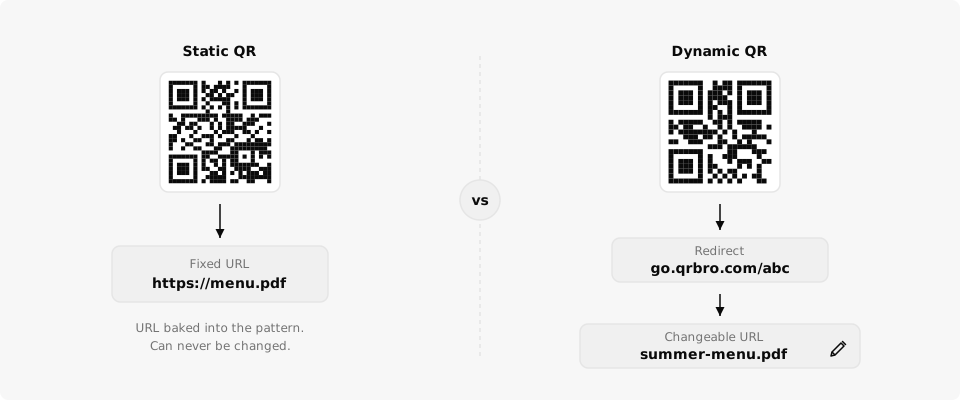
A static QR code has the destination URL baked directly into its pattern. The URL is literally encoded in the black-and-white squares. Once you generate it, that URL can never change.
This works fine for permanent links. If you're encoding your personal website and you know that URL will never change, static is enough. You can create a free static QR code here without an account.
The downside? No analytics, no editing, no flexibility. If the destination goes down or changes, the QR code becomes useless. You'd need to generate a new code, redesign your materials, and reprint everything.
A static QR code is like a tattoo. A dynamic one is like a business card you can reprint for free.
What Is a Dynamic QR Code?
A dynamic QR code doesn't point directly to your destination. Instead, it points to a short redirect URL that you control. When someone scans the code, they hit the redirect first, which sends them to whatever destination you've set.
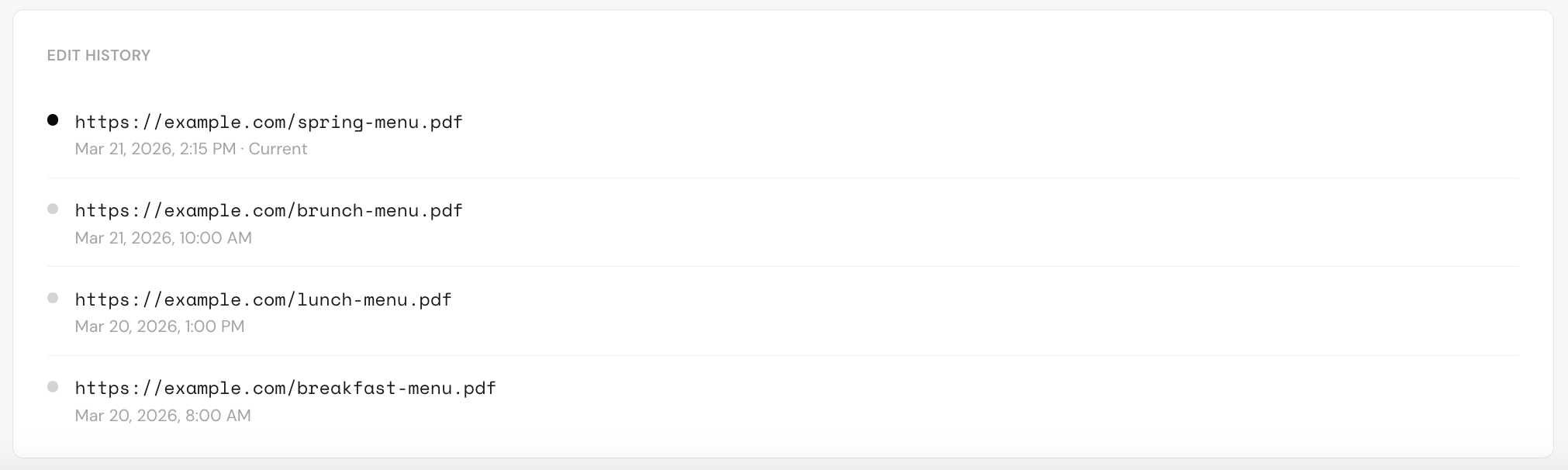
The QR code pattern stays the same forever. But you can change where it sends people as many times as you want, from a dashboard, without touching the printed code.
This also means every scan gets tracked. You can see how many people scanned, what device they used, where they were, and when it happened. With static codes, you get none of that.
Static vs Dynamic: Side-by-Side Comparison
| Feature | Static QR Code | Dynamic QR Code |
|---|---|---|
| Edit destination URL | No | Yes |
| Scan analytics | No | Yes |
| Expires if URL changes | Yes | No |
| File size / complexity | Larger (full URL encoded) | Smaller (short URL encoded) |
| Scan tracking by device | No | Yes |
| Scan tracking by location | No | Yes |
| Requires account | No | Yes |
| Cost | Free | Free or paid |
Dynamic codes produce a smaller, cleaner QR pattern because they encode a short URL instead of your full destination. That means they're easier to scan, especially at small print sizes.
Dynamic QR codes encode a short URL (roughly 20 characters) instead of your full destination (often 80+ characters). Fewer characters means a simpler pattern that scans faster and prints smaller.
When Should You Use Each?
Use static when the URL is truly permanent and you don't need scan data. Personal vCards, a WiFi password, or a link you'll never update.
Use dynamic for anything business-related. Menus, marketing campaigns, product packaging, event materials, real estate signs. Basically, if there's any chance the destination might change or if you want to know how many people scanned, go dynamic.
Most small business use cases need dynamic codes. A restaurant that prints table tents, an agent who puts signs in yards, an event planner who prints badges. These all benefit from being able to change the URL later and track who's scanning.
How QrBro Handles Dynamic Codes
Every QR code you create in QrBro is dynamic by default. You get a short redirect URL, full scan analytics, and the ability to change the destination whenever you want.
The free plan gives you 3 dynamic codes with analytics. If you need more codes, longer analytics retention, or team access, paid plans start at a price that makes sense for small businesses.
No bloat. No features you'll never touch. Just QR codes that work and data that tells you if anyone's scanning them.
Create your first dynamic QR code, it's free
Get StartedRelated guides
Free vs Paid QR Code Generators: What Do You Actually Get?
Not sure if you need a paid QR code generator? Here's what free plans actually include, what you're missing, and when it's worth paying.
LearnHow to Change a QR Code URL Without Reprinting
Already printed your QR code? You can still change where it goes. Here's how to update a QR code destination without reprinting anything.