QR Code Size Guide: How Big Should Your QR Code Be?
Find the right QR code size for any print material. Reference table for business cards, flyers, posters, and banners with recommended sizes and scan distances.
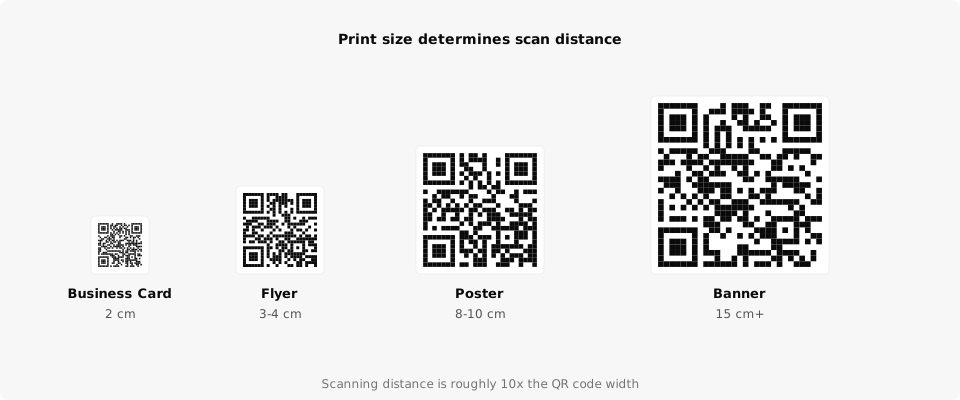
You designed the flyer, picked the perfect spot for the QR code, and sent it to the printer. Then someone tries to scan it from two meters away and nothing happens. QR code size determines scan distance, and getting it wrong means wasted prints and frustrated customers.
The Size and Distance Rule
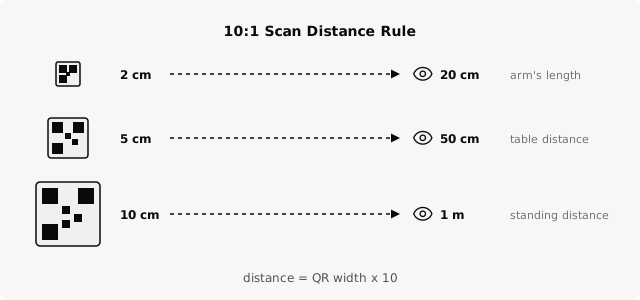
There's a simple relationship between how big a QR code is and how far away it can be scanned. The scanning distance is roughly 10x the width of the QR code.
A 3 cm code on a flyer works at about 30 cm (arm's length). A 10 cm code on a poster works at about 1 meter. A 20 cm code on a banner works at about 2 meters.
This 10:1 ratio is a reliable starting point. In practice, the actual distance depends on camera quality, lighting, and how much data is encoded in the code. Dynamic QR codes encode a short URL, which keeps the pattern simple and easier to scan at smaller sizes.
Rule of thumb: the scanning distance is roughly 10x the QR code width. A 3 cm code works at ~30 cm away.
Size Reference Table
Use this table to pick the right size for your print material. The "minimum" column is the absolute floor. Go with the "recommended" column if you have the space.
| Use Case | Minimum Size | Recommended Size | Scan Distance |
|---|---|---|---|
| Business card | 1.5 cm (0.6 in) | 2 cm (0.8 in) | 15-20 cm |
| Product label | 1.5 cm (0.6 in) | 2.5 cm (1 in) | 15-25 cm |
| Flyer / brochure | 2 cm (0.8 in) | 3-4 cm (1.2-1.6 in) | 20-40 cm |
| Table tent / menu card | 3 cm (1.2 in) | 4-5 cm (1.6-2 in) | 30-50 cm |
| A4/Letter poster | 3 cm (1.2 in) | 5-6 cm (2-2.4 in) | 30-60 cm |
| Large poster (A2/A1) | 6 cm (2.4 in) | 8-10 cm (3-4 in) | 60 cm - 1 m |
| Banner / signage | 10 cm (4 in) | 15-20 cm (6-8 in) | 1-2 m |
| Billboard | 30 cm (12 in) | 50+ cm (20+ in) | 3-5 m |
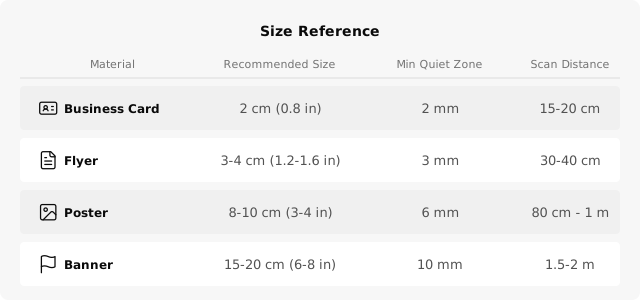
Never go below 1.5 cm. At that size, even a high-end phone camera struggles to read the code, especially in low light or at an angle.
What Affects Scannability
Size is the biggest factor, but not the only one. A few other things determine whether a scan works on the first try.
Contrast matters. Black on white is the gold standard. Dark on light works fine. Light on dark, colored codes, or low-contrast combinations cause scan failures. If you're printing on a colored background, add a white quiet zone (border) around the code.
The quiet zone is required. That blank border around the QR code isn't decoration. Scanners need it to detect where the code starts. Keep at least 4 modules (the small squares) of white space on all sides. Most generators, including QrBro, add this automatically.
Less data means easier scanning. A QR code encoding a 20-character URL produces a much simpler pattern than one encoding 200 characters. This is one reason dynamic codes scan better at small sizes. They encode a short redirect URL instead of your full destination.
Print Format Tips
Vector files (SVG) scale perfectly. If you're printing larger than a business card, export your QR code as SVG. Rasterized formats like PNG can get blurry when scaled up, which kills scannability.
Always test before printing. Print one copy at the actual size, tape it where it will go, and try scanning from the expected distance. Do this on at least two different phones. Thirty seconds of testing saves you from reprinting 500 flyers.
Dynamic QR codes encode roughly 20 characters instead of 80+, producing a simpler pattern with fewer modules. That means they scan faster and stay readable at smaller print sizes.
Quick Checklist
Before you send your design to print, run through this list:
- QR code is at least the recommended size for your material (check the table above).
- High contrast between the code and background (dark on light).
- White quiet zone on all sides, at least 4 modules wide.
- Exported as SVG for anything larger than a business card.
- Test-scanned at the actual distance people will scan from.
- Tested on at least two different phones.
If you're creating codes for restaurant menus, event materials, or real estate signs, the size requirements vary a lot. A table tent needs 3-4 cm. A yard sign might need 15 cm. Match the size to the scan distance, not the available space.
Create your first dynamic QR code, it's free
Get StartedRelated guides
Dynamic vs Static QR Codes: What's the Difference?
Learn the difference between static and dynamic QR codes, when to use each, and why dynamic codes are better for business.
PracticalHow to Create a QR Code for a PDF
Turn any PDF into a scannable QR code in three steps. Host your file, copy the link, paste it into QrBro, and download your code.