Free vs Paid QR Code Generators: What Do You Actually Get?
Not sure if you need a paid QR code generator? Here's what free plans actually include, what you're missing, and when it's worth paying.
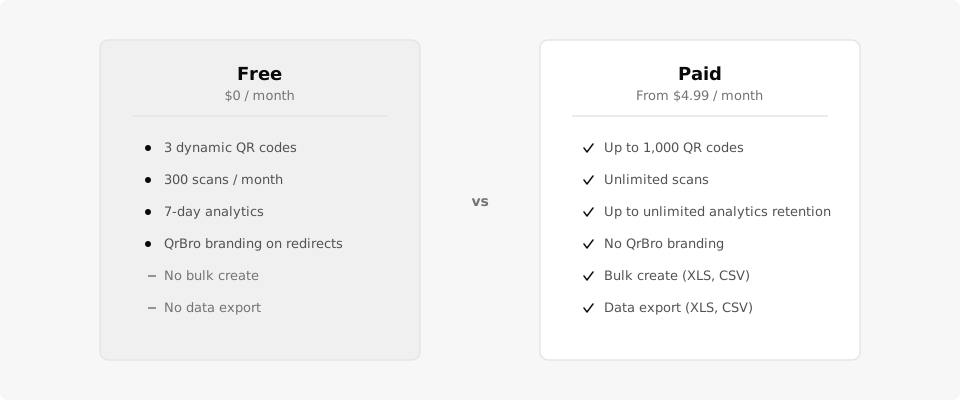
You searched for "free QR code generator," found a dozen options, and now you're wondering whether any of them are worth paying for. Fair question. The difference between free and paid QR code generators comes down to one thing: what happens after someone scans your code.
What "Free" Usually Means
Most free QR code generators give you a static code. You paste a URL, download a PNG, and that's it. No account, no dashboard, no way to edit the destination later, and zero data on who scanned.
That's fine for a one-off personal link (you can grab one here if that's all you need). But if you're printing codes for your business, a static code is a liability. The URL is baked into the pattern. If it changes, if the page moves, if you made a typo, you're reprinting everything. And you'll never know if anyone actually scanned it.
Some tools offer a free tier with dynamic codes instead. That's a better deal because you get a redirect layer, which means you can change the destination later and see scan data. But free tiers always have limits. The question is whether those limits matter for your use case.
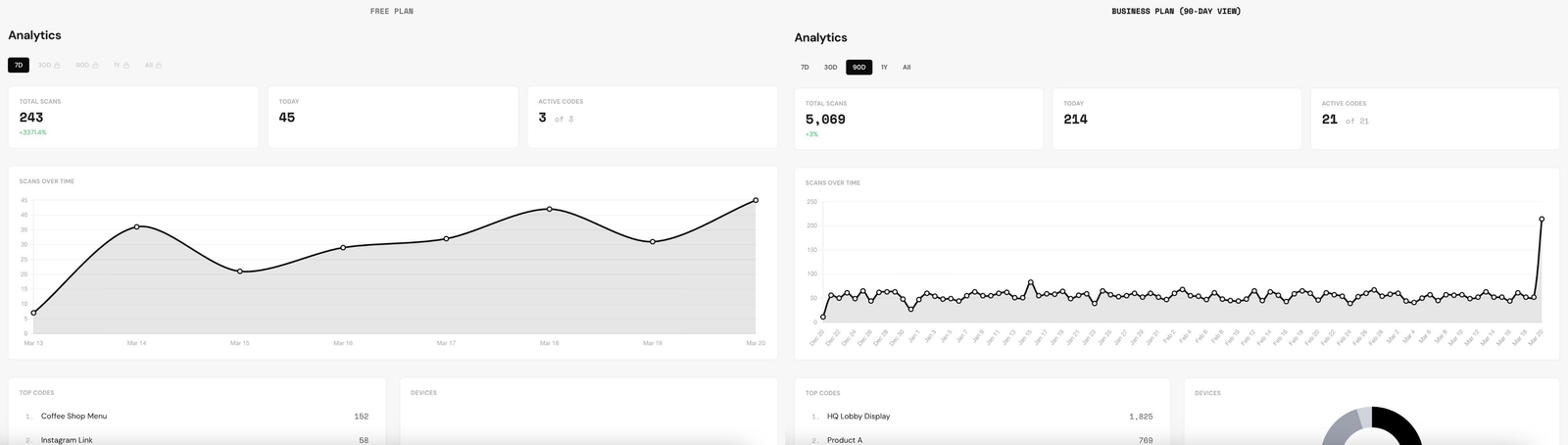
Most "free" QR generators give you a static code with zero analytics. QrBro's free tier gives you 3 dynamic codes with full analytics for 7 days.
What You Get on QrBro's Free Plan vs Paid
Here's a straight comparison of QrBro's four tiers. Every tier gives you dynamic codes with scan tracking. The difference is how many codes, how long analytics are retained, and whether you get team and bulk features.
| Feature | Free | Starter ($4.99/mo) | Pro ($14.99/mo) | Business ($29.99/mo) |
|---|---|---|---|---|
| Dynamic QR codes | 3 | 20 | 200 | 1,000 |
| Scans per month | 300 | Unlimited | Unlimited | Unlimited |
| Analytics retention | 7 days | 90 days | 1 year | Unlimited |
| QrBro branding on redirects | Yes | No | No | No |
| Bulk create (XLS, CSV) | No | No | Yes | Yes |
| Team seats | 1 | 1 | 3 | 10 |
| Data export (XLS, CSV) | No | No | Yes | Yes |
| Scheduled redirects | No | No | Yes | Yes |
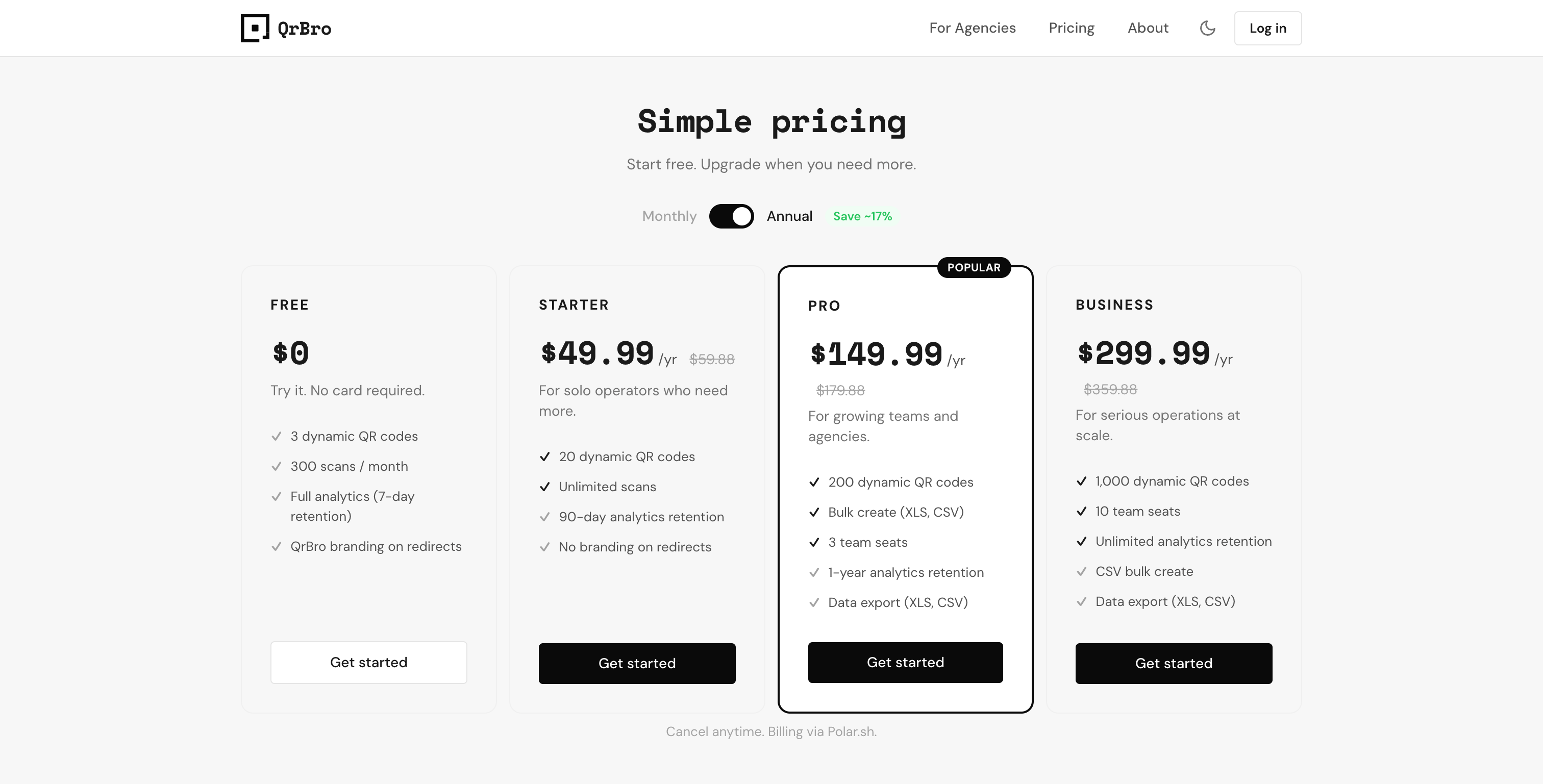
Annual billing saves about 17% on every paid plan. Pro drops from $179.88/yr to $149.99/yr.
When Free Is Enough (and When It's Not)
Free works if you need a handful of codes and just want to test whether QR codes fit your workflow. Three dynamic codes with a week of analytics is enough to print a code, stick it somewhere, and see if people scan.
Free stops working when you need more than 3 codes, when you want analytics beyond 7 days, or when the QrBro branding on redirects doesn't fit your brand. If you're running a restaurant with seasonal menus, managing property signs, or tracking engagement at events, you'll outgrow the free tier fast.
The jump to Starter ($4.99/mo) removes branding, bumps you to 20 codes with unlimited scans, and extends analytics to 90 days. For most small businesses, that's the sweet spot.
What About Other Free Generators?
Plenty of sites will generate a free QR code. The catch is almost always one of these:
- Static only. No editing, no analytics. Your code is a dead image file.
- Analytics behind a paywall. You can create a dynamic code, but scan data requires a paid plan.
- Feature bloat. You're paying $30+/mo for features aimed at enterprises, not small businesses.
- Aggressive upsells. The free tier exists to funnel you into an expensive plan you don't need.
QrBro focuses on what small businesses actually use: dynamic codes, analytics, and simple management tools. That's why the pricing stays low.
Watch out for "free" generators that require a credit card to sign up or auto-enroll you in a paid trial. QrBro's free plan is actually free. No card required.
The Bottom Line
Start free. Create a few codes, print them, check if anyone scans. If QR codes work for your business, upgrade to get more codes and longer analytics. If they don't, you've spent nothing finding out.
Create your first dynamic QR code, it's free
Get StartedRelated guides
Dynamic vs Static QR Codes: What's the Difference?
Learn the difference between static and dynamic QR codes, when to use each, and why dynamic codes are better for business.
LearnHow to Change a QR Code URL Without Reprinting
Already printed your QR code? You can still change where it goes. Here's how to update a QR code destination without reprinting anything.