Scheduled QR Code Redirects: Automate Where Your Code Points
Learn how scheduled redirects let you automatically change your QR code's destination based on day and time, without touching a thing.
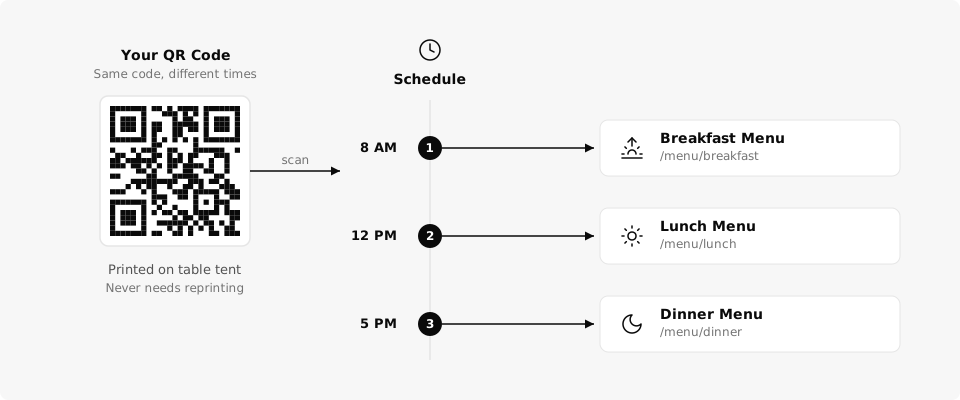
You have one QR code on a table tent, a property sign, or a poster. But the place it should send people depends on what time it is or what day of the week it is. Scheduled QR code redirects let you set rules so your code automatically switches destinations on a timetable you define. No manual updates, no logging in to flip a switch.
What Are Scheduled Redirects?
A dynamic QR code already lets you change the destination URL whenever you want. Scheduled redirects take that a step further: instead of changing the URL yourself, you set up time-based rules and the system handles it for you.
You pick the days of the week, set the time windows, and assign a destination URL to each window. When a scan happens, QrBro checks the schedule and routes the scanner to whichever URL matches the current day and time. The printed code never changes. The redirect switches behind the scenes.
Think of it like a thermostat for your QR code. You program the schedule once, and it runs on autopilot from there.
Use Cases
Scheduled redirects work best when the same physical code needs to serve different purposes throughout the day or week.
Restaurant menus. One QR code on the table, three different menus throughout the day. Breakfast menu at 8am, lunch menu at noon, dinner menu at 5pm. Your staff doesn't have to swap anything. Guests always see the right menu for the time of day. This is the most common use case, and there are more ways restaurants use QR codes beyond just menus.
Real estate open houses. During the week, a property sign's QR code points to the standard listing page with photos and specs. On Saturday and Sunday, it automatically switches to the open house landing page with directions, parking info, and the agent's direct number. Monday morning, it flips back.
Retail promotions. A store runs a flash sale every Friday from 10am to 6pm. The QR code on their window display shows the promotional page during sale hours and the regular catalog the rest of the time. No one needs to remember to update it.
Office and coworking spaces. A QR code outside a meeting room links to the day's schedule during business hours. After 6pm, it switches to a booking page so people can reserve the room for tomorrow. Simple routing that saves your front desk a dozen questions a day.
How It Works in QrBro
Setting up a scheduled redirect takes about a minute.
- Open your QR code's detail page in the QrBro dashboard.
- Click into the schedule editor.
- Pick the days of the week for this rule.
- Set the start and end time.
- Paste the destination URL for that time window.
- Add more rules if you need multiple time slots.
You can stack as many rules as you need. Breakfast, lunch, dinner. Weekday, weekend. Business hours, after hours. If a scan happens outside any scheduled window, QrBro falls back to your default destination URL, so scanners always land somewhere useful.
QrBro checks the schedule every minute and switches the active redirect automatically. Every change is logged in your edit history, so you always have a record of what your code was pointing to and when.
All scheduled changes are logged in your edit history, so you always know what your code was pointing to and when.
Scheduled redirects are available on the Pro plan ($14.99/mo) and the Business plan ($29.99/mo). If you're not sure which tier fits, the free vs paid comparison breaks it all down.
One QR code. Multiple destinations. Zero manual switching. Print it once and let the schedule do the work.
Create your first dynamic QR code, it's free
Get StartedRelated guides
Dynamic vs Static QR Codes: What's the Difference?
Learn the difference between static and dynamic QR codes, when to use each, and why dynamic codes are better for business.
Use CasesRestaurant QR Code Ideas: 6 Ways to Use Them
Restaurant QR code ideas that go past your digital menu: 6 practical ways to use QR codes in a restaurant, from daily specials to Google review links.